
Download Korl – AI‑Powered Presentation Builder for Product Teams
Overview of Korl: AI‑Driven Presentation Automation
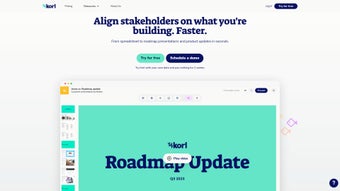
Korl is a web‑based AI tool created to simplify product communications for product managers, designers, and developers. By auto‑generating presentations for internal stakeholders and external customers, Korl removes the repetitive manual work that typically eats up valuable time. The platform integrates directly with popular productivity suites such as Jira, Google Drive, and Figma, allowing users to pull live project data, sync files, and generate polished decks in seconds. Whether you need a sprint‑review deck, a customer‑update slideshow, or an internal status report, Korl adapts its output to the intended audience, automatically tailoring tone, depth, and visual style.
The core promise of Korl is efficiency without sacrificing clarity. Its AI engine analyzes raw data—issues logged in Jira, design mock‑ups stored in Figma, or documents kept in Google Drive—and transforms that information into concise, visual narratives. The result is a set of slides that highlight key metrics, progress trends, and upcoming milestones while keeping the narrative focused on what matters most to the viewer. This focus on stakeholder alignment makes Korl especially valuable for product teams that need to keep executives, sales, support, and engineering on the same page.
While Korl shines in speed and ease‑of‑use, it does have a few constraints. Real‑time collaboration features are limited, meaning multiple users cannot edit the same deck simultaneously. Additionally, the platform currently offers only basic analytics, so teams looking for deep performance insights will need to supplement Korl with other BI tools. Nevertheless, for most product managers seeking a quick, reliable way to turn raw project data into compelling presentations, Korl offers a compelling blend of automation, customization, and cross‑platform connectivity.
Another noteworthy aspect is Korl’s commitment to data privacy. Because the service operates entirely in the cloud, all uploaded files are encrypted both in transit and at rest, meeting the strict standards required by regulated industries. Companies that have adopted Korl report a measurable reduction in the time spent on deck preparation—often cutting the effort by more than half—allowing their teams to focus on strategic decision‑making rather than slide‑building mechanics.
Key Features That Set Korl Apart
- AI‑Generated Slides in Seconds: Input a project link or data source and let Korl produce a complete slide deck with suggested titles, bullet points, and charts.
- Deep Integration with Jira, Google Drive, and Figma: Pull issues, design assets, and documents without leaving the platform.
- Audience‑Specific Templates: Choose from pre‑built templates for customer updates, sprint reviews, executive summaries, and more.
- Customizable Visual Styles: Adjust color palettes, fonts, and layout options to match corporate branding.
- Data Summarization Engine: AI condenses large data sets into digestible metrics, highlighting trends and outliers automatically.
- One‑Click Export: Download decks as PowerPoint, PDF, or share a live link with view‑only permissions.
- Secure Cloud Storage: All generated content is stored on encrypted servers compliant with GDPR and SOC‑2.
- Version History: Revert to previous deck versions with a simple click, ensuring no work is lost.
- Multi‑Language Support: Generate presentations in English, Spanish, German, French, and Japanese.
- Regular Updates: New template packs and AI improvements are released monthly.
How These Features Translate into Real‑World Benefits
When a product manager receives a request for a sprint‑review deck, the traditional workflow involves gathering data from Jira, exporting charts, manually creating slides, and then polishing the narrative. With Korl, that entire process can be reduced to a single click. The AI evaluates the selected sprint, extracts completed tickets, calculates velocity, and automatically inserts a burn‑down chart. The resulting deck not only saves hours of manual effort but also reduces the chance of human error, such as missing a critical metric or mislabeling a chart.
The integration with Figma means design teams can embed live mock‑ups directly into the presentation, keeping stakeholders up‑to‑date with the latest visual direction. Meanwhile, the Google Drive connector ensures that any supporting documents—product requirement docs, user research reports, or market analyses—can be referenced instantly, turning a static slide deck into an interactive knowledge hub.
Customizable templates empower teams to maintain brand consistency across all communications. Whether a presentation is destined for a C‑suite executive or an external client, Korl’s template engine automatically adjusts tone and depth, delivering the right level of detail without additional editing. This level of automation not only speeds up delivery but also reinforces a professional image, building trust with both internal and external audiences.
Beyond the core capabilities, Korl’s AI continually learns from user feedback. Each time a user tweaks a generated slide, the system records the change and refines its future suggestions, resulting in progressively more accurate and context‑aware decks. Over time, teams experience a compounding productivity boost as the AI becomes attuned to their specific terminology, metrics, and visual preferences.
Installation, Setup, and Compatibility
Korl is a pure SaaS solution, so there is no traditional “install” process. Users simply create an account on the Korl website, verify their email, and begin linking their existing tools. Below is a step‑by‑step guide to get you up and running in under ten minutes.
Step‑by‑Step Onboarding
- Create an Account: Visit korl.io/signup and sign up with your work email. A verification link will be sent to confirm ownership.
- Connect Your Workspaces: After logging in, navigate to the “Integrations” tab. Click “Add Integration” and authorize Korl to access Jira, Google Drive, and Figma using OAuth. Permissions are read‑only for data extraction, ensuring security.
- Select a Template Pack: Choose from the library of audience‑specific templates. Each pack includes pre‑configured slide layouts, color schemes, and placeholder text.
- Generate Your First Deck: Paste a Jira project URL or select a Figma file from the dropdown, then click “Generate Slides.” The AI will process the data and present a draft deck within seconds.
- Fine‑Tune and Export: Review the auto‑generated slides, edit any content as needed, then click “Export” to download a PowerPoint file or share a live link.
Operating System and Browser Support (Web‑Based, Cross‑Platform)
Because Korl runs entirely in the cloud, it works on any modern browser—Chrome, Edge, Firefox, and Safari—across Windows, macOS, Linux, and even mobile browsers on Android and iOS. The responsive design ensures that the editor remains usable on tablets, allowing product managers to tweak decks on the go.
Security‑focused organizations will appreciate Korl’s compliance certifications. Data transmitted between your browsers and Korl’s servers is encrypted via TLS 1.3, and at rest, all files are stored using AES‑256 encryption. The platform also supports SSO (SAML 2.0) for enterprise environments, making it easy to integrate with existing identity providers such as Okta or Azure AD.
Troubleshooting Common Issues
If you encounter a “Connection Timeout” error when linking Jira, verify that your Jira instance allows API access and that you have the necessary permissions. For Google Drive integration problems, ensure that the account you use has at least “Viewer” access to the files you wish to reference. Should any browser incompatibility arise, clearing cache or switching to an incognito window often resolves script loading issues.
Overall, the lack of a heavy client download and the universal browser compatibility make Korl a low‑maintenance solution that can be adopted quickly across teams of any size.
For organizations with strict IT policies, Korl also offers a private‑cloud deployment option. This variant runs within a dedicated virtual private cloud (VPC) behind the company firewall, preserving all the same features while giving administrators full control over data residency and network access.
Pros and Cons of Using Korl
Pros
- Lightning‑fast AI generation cuts presentation creation time by up to 80%.
- Seamless integration with Jira, Google Drive, and Figma eliminates manual data gathering.
- Audience‑specific templates ensure consistent branding and appropriate detail level.
- Web‑based, cross‑platform access works on Windows, macOS, Linux, Android, and iOS.
- Secure cloud storage with GDPR, SOC‑2, and SSO support for enterprise compliance.
- Regular feature updates keep the tool current with design trends and AI improvements.
- Version history and rollback protect against accidental loss of work.
- Multi‑language generation expands reach for global product teams.
Cons
- No real‑time collaborative editing; team members must edit sequentially.
- Advanced analytics and KPI tracking are limited compared to dedicated BI platforms.
- Customization beyond provided templates may require manual adjustments in PowerPoint.
- Pricing tier for unlimited decks may be higher for large enterprises.
- Reliance on internet connectivity; offline work is not supported.
- Initial learning curve for non‑technical users unfamiliar with AI‑driven workflows.
- Exported files may need minor formatting tweaks to meet strict corporate style guides.
Frequently Asked Questions
Is Korl free to use?
Korl offers a 14‑day free trial with full feature access. After the trial, you can choose between a “Starter” plan ($12 per user/month) or an “Enterprise” plan with custom pricing and additional security controls.
Can I import an existing PowerPoint deck into Korl?
Yes. Korl allows you to upload an existing PPTX file, after which the AI can suggest updates, replace data placeholders, and reformat slides according to the selected template.
How secure is my data when using Korl?
All data in transit is encrypted with TLS 1.3, and data at rest is protected by AES‑256 encryption. Korl complies with GDPR, SOC‑2, and offers SSO integration for enterprise identity management.
Does Korl support multilingual presentations?
Yes. The AI can generate decks in English, Spanish, German, French, and Japanese. Language selection is available in the template settings before generation.
What happens if I need a custom template not offered out‑of‑the‑box?
Korl provides a “Custom Template Builder” where you can design your own slide layouts using a drag‑and‑drop interface. Once saved, the custom template can be reused for future decks.
Conclusion – Is Korl the Right Tool for Your Team?
If you spend a significant portion of your week assembling slide decks, Korl can dramatically accelerate that workflow. Its AI‑driven generation, deep integrations with Jira, Google Drive, and Figma, and a library of audience‑specific templates make it a powerful ally for product managers, designers, and any stakeholder who needs to communicate product progress quickly and clearly. While the lack of real‑time collaboration and limited analytics might be a drawback for some large enterprises, the overall value‑proposition—speed, consistency, and security—outweighs these minor limitations for most teams.
Beyond the immediate productivity gains, Korl also fosters a culture of data‑driven storytelling. By automatically surfacing the most relevant metrics and visualizing trends, the tool encourages teams to base discussions on concrete evidence rather than anecdote. This shift can improve decision‑making, reduce meeting times, and ultimately lead to faster product iterations.
Ready to cut presentation prep time in half? Start your free trial today and experience the future of product communication.



.png)



